Pitch Deck Companion
Own your video pipeline. Stop depending on cloud providers. Stay ahead of competitors still renting.
Andrew Free | Consultant & Engineer
Why the Current Setup Doesn't Scale
$2,500/month
on Google Veo and Higgsfield, and API pricing is even worse at your volume
100+ clips generated per day with no way to batch or automate at scale
State-specific creatives require regenerating the same line 50 times, one by one
Scripts broken into 8-second chunks, generated manually line by line through Veo
No control, no customization, and your creative IP leaves the building every time
20-line script × 2–5 state-specific lines × 50 states
Each generated one-by-one through the Veo interface. No batching. No automation.
Submit one template prompt: "If you live in {STATE}, you need to hear this"
System auto-generates all 50 variants. Run on demand or front-load overnight
No rate limits, no per-generation cost, no manual clicking
Same workflow scales to any variable: city names, product names, offers
What's Changed
You stop being dependent on any single provider's pricing, uptime, or terms of service
Your prompts, brand assets, and ad creatives never leave your network. You own everything you generate
Open-source models are rapidly closing the gap with Veo and the field moves fast. Having someone tracking it keeps you ahead of competitors still renting
Fine-tuned models trained on YOUR ad style can exceed generic cloud output. That's a competitive advantage nobody else has
Image generation is even easier than video on this hardware. Product photos, social graphics, and ad creatives all run locally with the same setup
Hardware pays for itself in months (~$50/mo electricity vs $2,500/mo cloud). One machine gets you started but if the team needs production AND research running at the same time, plan for Tier 2
Quick Glossary
A specialized processor designed for parallel computation. In AI, GPUs handle the math-heavy work of running models. The key spec is how much dedicated memory (VRAM) it has, since the entire model needs to fit in that memory to run.
AI models are released at full precision (large, highest quality) and quantized versions (compressed to fit smaller hardware). Quantization trades some accuracy for smaller size. With 256GB of memory you can run most models at full precision, which most people can't.
NVIDIA's parallel computing platform. It's the dominant framework for AI workloads generally, and specifically the leading video generation models are optimized for CUDA first. Apple Silicon and AMD have alternatives and the open ecosystem is growing fast.
AI models where the code and trained weights are publicly released. You download them, run them on your own hardware, and pay nothing per use. Companies like Meta, Alibaba, and Tencent release competitive models this way.
An architecture where CPU and GPU share the same pool of memory (like Apple Silicon). Instead of being limited by a GPU card's dedicated VRAM, the model can use all 256GB. The tradeoff is lower bandwidth than dedicated GPU memory (HBM).
Taking a pre-trained model and further training it on your specific data. For your use case, that means feeding it your existing ad content so it learns your visual style, brand colors, and format preferences. The output becomes tailored to you.
Workflow Overview
Team queues prompts via a simple web UI, no technical knowledge needed
Queue jobs before you leave and get 100+ clips delivered to your folder by morning
State creatives: submit template + variable list → all 50 variants auto-generated
Slack/email notification when batch is complete and ready to download
Powered by ComfyUI, an open-source visual workflow builder used across the industry
Under the Hood
ComfyUI is the open-source workflow engine that ties everything together. Think of it as the visual programming layer between your team and the AI models.
Build video generation pipelines visually by connecting nodes. No coding needed for the team. Workflows are saved, shared, and versioned like templates.
Thousands of community nodes for upscaling, face correction, style transfer, batch processing, audio sync, and more. New capabilities added weekly by the open-source community.
One tool handles product photos (Flux, SDXL), video generation (LTX, Wan, HunyuanVideo), audio/voice, and post-processing. Not separate apps for each task.
Built-in queue for batch jobs. Feed it 50 state variants and walk away. Remote queue support means team members can submit jobs from their browser without touching the server.
When a better model drops, swap it into your existing workflow by changing one node. No rebuilding, no migration. The pipeline stays the same, the output gets better.
Used by studios, agencies, and independent creators worldwide. Active development, frequent updates, and a community that shares workflows for every use case imaginable.
Staged Investment
Tier 1 -- Start Here
$6.5-8.5K
ENABLES: Quick Wins Across the Board
Tier 2 -- Add CUDA
+$6-10K
ENABLES: Production Video Quality
Tier 3 -- Scale Up
+$5-7K
ENABLES: Scale + Custom Models
Industry Context
HBM: AI hardware uses HBM (High Bandwidth Memory). It's stacked directly on the GPU chip for maximum speed
GPU Memory: You can't just add cheaper cards together to get more memory. Each GPU has its own isolated HBM pool
Regular RAM: Regular computer RAM is too slow and too far from the GPU for this kind of work
Compression: Software keeps getting smarter too. TurboQuant (Google, 2026) compresses LLM memory 6x with zero accuracy loss. Similar gains are reaching video models
DDR Shortage: Almost all high-end GPU memory is going to AI companies. That's the DDR shortage you may have heard about
Supply: Everyone is overbuying so they don't run out of capacity. Supply can't keep up
Enterprise Shift: NVIDIA shifted to enterprise. Their DGX/HGX systems run $250K-$500K+ per unit
Apple (Mar 2026): Apple killed the Mac Pro, pulled the 512GB Mac Studio, raised 256GB pricing $400
$6.5K is the entry point (Mac Studio 256GB starts at $6,399). A production cluster runs closer to $20K+.
For context: a single NVIDIA H100 GPU costs $35K. A DGX B200 (8x180GB GPUs) is $634K. Even a hobbyist dual-GPU rig with water cooling runs ~$20K in parts alone.
Financial Breakdown
Based on your actual spend: $2,500/mo ($30K/year)
Tier 1 ($6.5-8.5K)
0
months to break even
Year 1
$0
Year 2
$0
Tier 2 (+$6-10K)
0
months to break even
Year 1
$0
Year 2
$0
Tier 3 (+$5-7K)
0
months to break even
Year 1
$0
Year 2
$0
Every tier pays for itself. But the ROI isn't just dollars saved. It's not being locked into someone else's platform, pricing, or timeline.
Phased Approach
77%
70-85% of Veo quality
Side-by-side benchmark against your actual Veo output. Product shots and B-roll already very close. Lip sync via two-stage pipeline (video gen + dedicated sync model).
87%
80-95% of Veo quality
Optimized workflows tuned to your ad formats. State creative batch automation fully operational. Lip sync pipeline refined for podcast-style talking heads.
97%
90-100%+ matches or exceeds Veo
Custom models trained on YOUR ad style beat generic cloud output. Next-gen lip sync models (SkyReels V4, daVinci) expected to close the remaining gap.
Artificial Analysis / Text-to-Video with Audio / March 2026
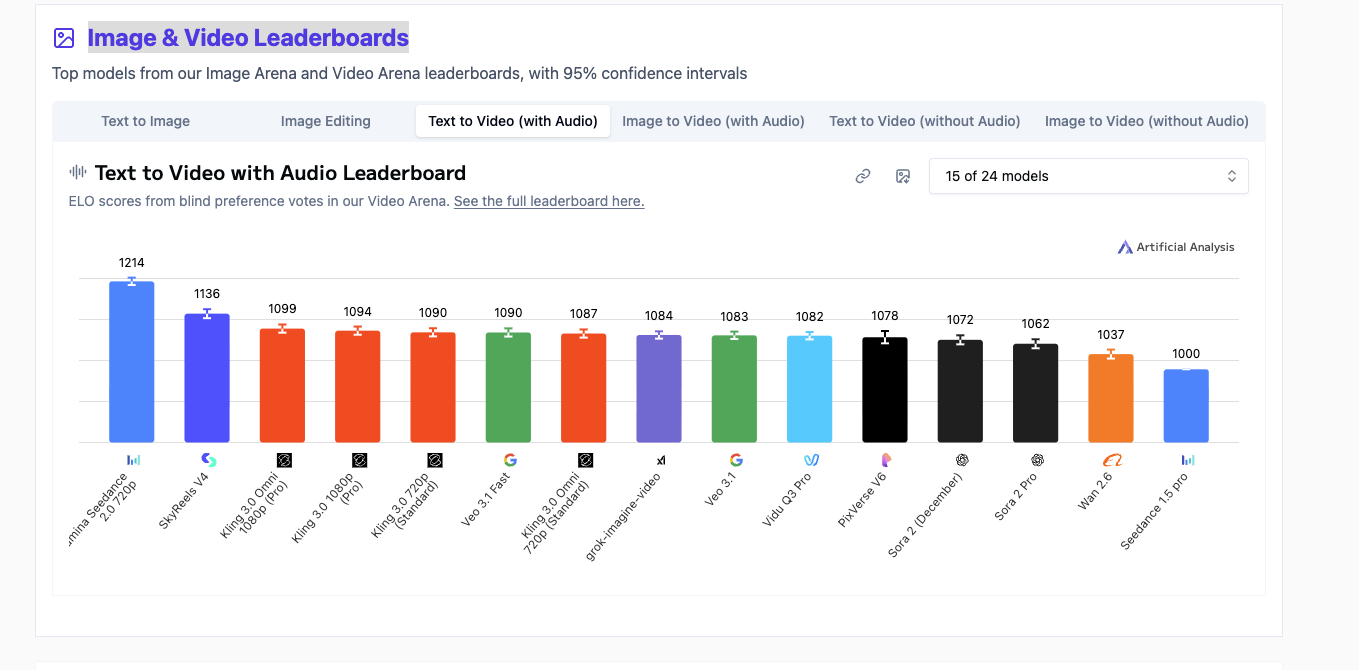
Elo scores from blind preference votes. SkyReels V4 (open) beats multiple Veo variants. Live leaderboard →
The Value I Bring
The hardware is the minimum investment. The real value is having someone who lives in this space keeping you ahead of a field that changes every week.
Internal tools, Notion integrations, dashboards, field updates, office hours. On-call for any technical question, not just AI. One person covering a lot of ground.
AI can generate code, but someone needs to know how it works to ship it reliably. The real value is a CS background plus daily experience with frontier models. That combination is rare right now.
Everything I build gets documented. Workflows, tools, and SOPs are designed so the team can run them without me. My role shifts from building to research and optimization over time.
CS degree, HPC infrastructure at Penguin Computing, startup experience in the Bay Area, using AI tools since before ChatGPT. More detail in the appendix if you're curious.
What Happens Next
Show me how your team generates content today. I need to see the bottlenecks before recommending anything specific
Figure out where I fit, what's most valuable to build first, and what the arrangement looks like for both sides
Procure Tier 1 (as of March 2026, 256GB configs ship in ~6 weeks), run side-by-side comparisons against your Veo output
Build the state creatives batch system or whatever we identify as the highest-impact quick win
Tier costs reflect hardware only. Compensation negotiated separately once scope and role are clear.
Tier 1 starts at $6,399 from Apple. Mac Studios hold resale value extremely well if we stop there.